An instant email alert is most useful when the subject line answers the first questions a reader has before opening the message: which ticker is involved, who reported the transaction, what happened, and how large the reported change was. A well-structured subject can surface the ticker, insider title, buy or sell action, share count, reported price, estimated transaction value, and position change in one scan.
That summary is a convenience layer over a public SEC filing. It is not a replacement for the filing, a statement of motive, or a recommendation to buy, sell, hold, or trade a security. The goal is to help you decide which public Form 4 deserves a closer read without forcing you to open every email first.
Readers looking for Insider Trading Alerts are often trying to reduce the time spent refreshing public filing pages. A clear subject line helps them decide which message belongs in the next research pass.
Key Takeaways
- A useful subject line can show the ticker, reporting person's role, transaction type, shares, price, value, and position change.
- Subject-line details are a summary of public Form 4 data; the linked SEC filing remains the source to verify.
- InsiderTradeAlerts measures instant-mode speed from public-feed detection to outbound email acceptance, not inbox placement.
- A buy or sell description does not establish motive, personal funds, future performance, or a trading instruction.
What an instant Form 4 email subject is designed to do
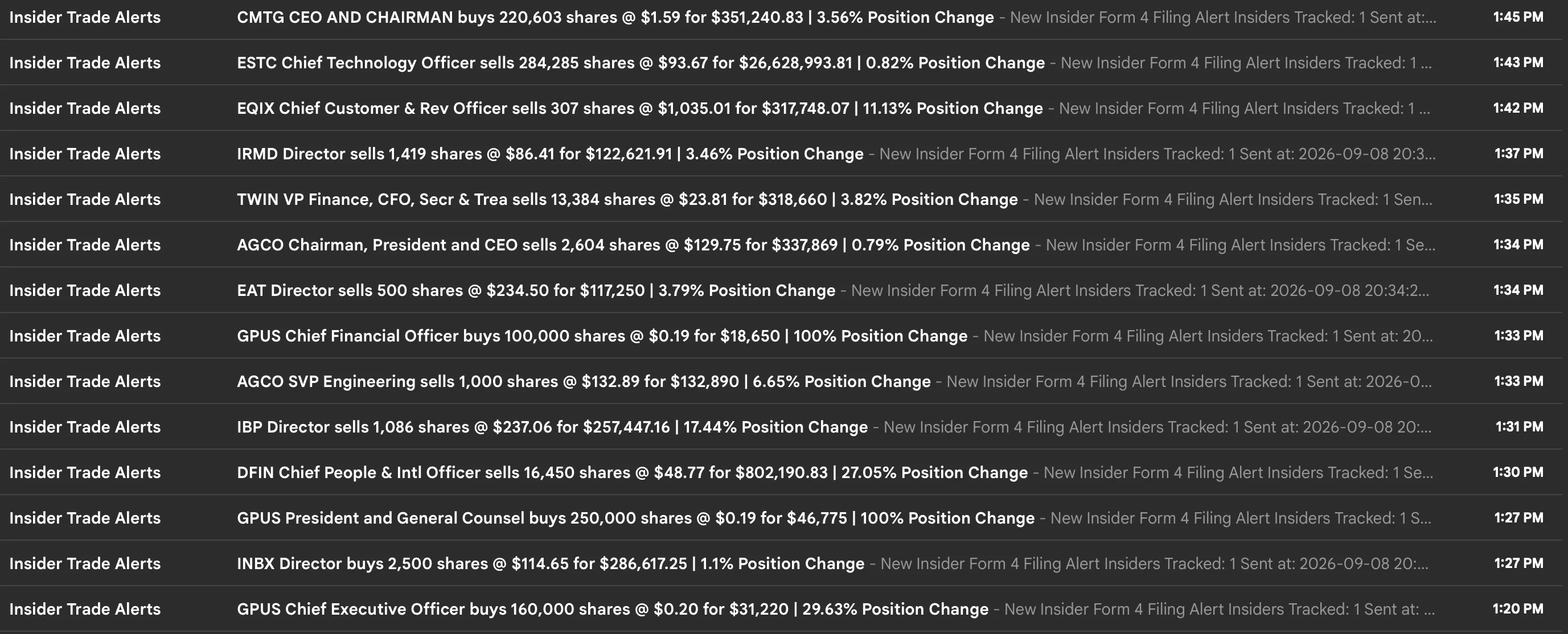
Email subjects are a limited space, but they are also the first place many readers triage a busy alert inbox. The subject should put the highest-value facts near the beginning instead of making the reader open a message to find the ticker or transaction type.
For a public SEC Form 4 alert, those facts usually come from fields such as the issuer, reporting person, relationship to the issuer, transaction date, transaction code, number of securities, reported price, and ownership after the transaction. The SEC Form 4 document shows the tables and footnotes that contain those details.
The subject line is therefore a readable index of a filing, not a new source of information. It can tell you what to review first, while the original filing tells you exactly what was reported and what qualifications appear in the footnotes.
An Insider Trade Alerts workflow is most useful when the summary remains tied to the original SEC document. The notification can save scanning time, while the filing supplies the details needed for independent review.
Which details can appear before you open the email?
The alert format used for InsiderTradeAlerts email notifications begins with an alert label and then puts the transaction summary in a consistent order. That structure lets you scan the message list first and open the underlying filing when you want to verify the details.
1. Ticker and issuer context
The ticker is the quickest way to identify the public company associated with the filing. In the screenshot, symbols such as CMTG, ESTC, EQUIX, IRMD, and GPUS appear at the start of the transaction summary.
Ticker-first formatting helps when several alerts arrive close together. It also makes an email easier to find later when you search for a company or compare a filing with the issuer's other public disclosures.
The ticker is not the entire identity of the filing. Before relying on a summary, confirm the company name, the issuer shown in the Form 4, and whether a ticker change, share class, or corporate action affects the symbol you recognize.
2. The reporting person's role
The subject can also show the reporting person's role, such as chief executive officer, chief financial officer, director, chairman, or another officer title. That context helps the reader understand how the person is connected to the issuer.
Role information should be read as a reporting relationship, not as a measure of conviction. A title does not prove why a transaction occurred, whether the person used personal funds, or whether the person expects a particular stock outcome.
The filing itself is the place to verify the reporting person and relationship. If the subject shortens a long title for readability, open the Form 4 before drawing conclusions from the abbreviated wording.
3. Buy or sell action
The transaction verb makes the subject immediately scannable. The screenshot uses wording such as “buys” and “sells” so the reader can separate reported acquisitions from reported dispositions without opening each message.
That wording should be understood as a description of the reported transaction. A Form 4 can include open-market purchases and sales, but it can also report awards, option exercises, tax-related dispositions, gifts, or other ownership changes. Transaction codes and footnotes provide the needed detail.
For example, SEC Form 4 code P generally identifies a purchase of securities on an exchange or from another person, while other codes describe different events. A subject-line verb is a useful starting point, not a complete interpretation of the filing.
4. Share count and reported price
The number of shares and reported price add scale to the transaction description. A subject might state that an officer bought 100,000 shares at $0.19 or that a director sold 1,419 shares at $86.41.
These fields help the reader decide whether to open the filing, but they still need context. A price may be a single reported price, a weighted average, or part of a range explained in a footnote. Share count can also mean something different for common stock, derivative securities, or transactions connected to an equity plan.
The safest workflow is to treat the subject as a compact preview and then compare the displayed values with the Form 4 table. Do not assume that a large share count means a large economic exposure without checking the security type and ownership details.
5. Transaction value
An alert subject will show the total transaction value so you can sort a busy inbox by rough dollar scale. The value is commonly derived from the reported share count and price, but the precise interpretation depends on the filing fields and any price range or footnote.
This number is useful for triage. It does not prove that the person committed that amount of personal cash, because a Form 4 can describe transactions involving compensation, derivative exercises, tax withholding, or other arrangements.
The value also should not be treated as a standalone measure of importance. A smaller purchase can represent a larger percentage change in reported holdings, while a large sale can be part of a pre-arranged plan or a routine tax-related event. The subject helps you see the number; the filing explains its limits.
6. Position change
Position change describes how the reported transaction compares with the person's holdings as represented in the alert data. In the screenshot, subjects include percentages such as 3.56%, 11.13%, 27.05%, and 100% Position Change.
This percentage can provide useful context because it distinguishes a small change relative to a large existing position from a transaction that materially changes the reported holding. It should still be read alongside the ownership table, which may separate direct and indirect ownership or show different securities.
Position change is not a score. A larger percentage does not establish stronger conviction or predict a future return. It is simply another way to describe the relationship between the reported transaction and the available ownership data.
Why subject-line detail matters for email workflows
Without a useful subject, a Form 4 alert can become another message that must be opened, read, and manually sorted before the reader knows whether it is relevant. A predictable structure makes the inbox itself a first-pass research queue.
That is especially helpful when multiple public filings arrive in a short period. A reader can search or group messages by ticker, compare transaction types, and identify which alerts should be opened for source verification. The process saves attention without changing the underlying evidence.
An SEC Form 4 filing guide can help new readers understand the reporting person, transaction code, ownership form, and footnotes that sit behind the summary. The subject line is the quick index; the filing is the document to interpret.
How instant delivery relates to the subject line
Readable formatting only helps if the alert arrives while the information is still useful to the reader's workflow. InsiderTradeAlerts publishes a daily instant-delivery benchmark that defines its measurement clearly: Point A is detection of a filing in the SEC Form 4 current-filings Atom feed, and Point B is outbound email acceptance by the email provider.
On the benchmark page last updated September 2, 2026, a five-trading-day snapshot covered 895 alerts. It reported an average detection-to-outbound time of 0.827 seconds, a median of 0.816 seconds, and a 95th-percentile time of 1.050 seconds. The same snapshot reported that 91.7% of alerts were sent within one second.
Those figures describe the service's detection-to-outbound layer. They do not measure how quickly a mailbox provider places the message in an inbox, how fast a phone displays a notification, or how long a reader takes to open the filing. That distinction keeps the benchmark precise and prevents a delivery metric from being mistaken for an outcome claim.
The underlying source is public. The SEC's current filings page and EDGAR systems are where the filing enters the public record. An alert workflow can monitor that stream, filter eligible activity, format the subject, and send the message, but it cannot make the filing private or guarantee how an individual device displays it.
Instant alerts versus scheduled summaries
Not every research workflow needs the same delivery cadence. Instant email alerts are designed for readers who want a message as soon as the platform processes an eligible public filing. Scheduled summaries are designed for readers who prefer to review filtered activity at selected times rather than receive every alert as it happens.
Both formats benefit from the same subject-line structure. A digest is easier to scan when every message uses consistent fields, and an instant alert is easier to prioritize when the ticker and transaction type are visible immediately.
The choice is about workflow fit, not a claim that one cadence produces a better investment result. A reader can use a scheduled summary for lower interruption, an instant mode for faster awareness, or separate filters and channels for different research tasks.
A source-first way to use the subject line
Treat the email subject as a triage checklist rather than a conclusion. A simple review sequence is:
- Identify the ticker and issuer. Confirm that the symbol in the subject matches the company named in the filing.
- Read the role. Check whether the reporting person is an officer, director, or another covered reporting person.
- Review the action. Confirm the transaction code and whether the table reports an acquisition, disposition, award, exercise, gift, or another event.
- Compare the numbers. Check shares, reported price, transaction value, and position change against the Form 4 tables.
- Read the footnotes. Look for indirect ownership, plans, price ranges, tax-related transactions, and other qualifications.
- Open the original filing. Use the SEC source link before using the alert as part of broader company or market research.
This process keeps the subject line in its proper role: it reduces the cost of noticing a filing, then points you back to the public record.
What the subject line cannot tell you
Even a detailed subject line leaves important questions unanswered. It usually cannot explain why the person acted, whether the transaction was planned in advance, how the transaction fits the person's finances, or what the company or stock will do next.
A reported purchase is not automatically a bullish conclusion. A reported sale is not automatically bearish. The same transaction can have different explanations depending on the person's ownership structure, compensation, tax obligations, plan documents, liquidity needs, and broader company context.
This is why public filing alerts should remain informational. The summary can help you find the document faster, but it cannot replace independent research or turn a filing into a personalized trading instruction.
Frequently Asked Questions
What details should an instant Form 4 email subject include?
At minimum, a useful subject should identify the ticker or issuer, reporting person's role, transaction type, share count, reported price, and a link or path to the source filing. Transaction value and position change can add helpful triage context when their calculation is clearly defined.
Does the subject line replace the SEC Form 4?
No. It is a readable summary of selected filing fields. Open the original Form 4 to verify the transaction tables, ownership form, footnotes, and any details that were shortened for the email subject.
What does the instant-delivery benchmark measure?
The benchmark measures detection of a filing in the SEC Form 4 current-filings feed through outbound alert acceptance by the email provider. It does not include mailbox-provider inbox placement, device notifications, or the reader's review time.
Does a reported buy in the subject mean the insider is bullish?
No. The subject describes a reported transaction. It does not establish motive, personal funds, conviction, or a future price direction.
Can I use scheduled summaries instead of instant emails?
Yes. A scheduled summary can be a better fit when you prefer to review filtered, source-linked activity at set times. The same subject-line fields remain useful because they make each message easier to scan.
The bottom line
An instant email alert earns its place in a research workflow by making the first scan easy. A subject line that includes the ticker, insider role, buy or sell action, shares, price, transaction value, and position change lets you decide whether the message deserves a closer look before opening it.
The alert is still only a summary of public SEC Form 4 data. Use the linked filing to verify the details, read the footnotes, and understand what the transaction does and does not establish. The benchmark page can help you evaluate delivery timing, while the filing remains the source of truth.
Research-not-advice disclosure: This article is for general education. Public SEC filing data and alert summaries are informational and are not recommendations to buy, sell, hold, or trade securities. InsiderTradeAlerts is not a broker-dealer or registered investment adviser. Review the original filing and perform independent research before making any financial decision.